Your WhatsApp, answered and followed up. Even at 2 am.
WhatsApp Suite replies to customer questions from your real stock and orders, chases abandoned carts, confirms COD orders and sends campaigns. When something needs a person, it hands over to your team in the same inbox.
No card for the pilot. Your own number, on the official Meta WhatsApp Business Cloud API.
Six jobs that usually sit with whoever is holding the phone that day.
Answers from real data
The support agent reads your products, stock and orders before it replies. "Is the 250g jar in stock?" gets a real answer. If it is unsure, it says so and hands the chat to you.
Recovers abandoned carts
A customer leaves items behind, and a reminder goes out with their own cart link after the delay you set. You write the wording once; WhatsApp approves it once.
Confirms orders and COD
Order confirmations, one-tap COD confirmation, shipping updates and back-in-stock alerts, sent from your own number as the order moves.
One inbox for the team
WhatsApp and Telegram chats in one place. Reply yourself, let the agent draft, or take over mid-conversation. Nothing lives in someone's personal phone.
Campaigns that are not blasts
Send approved messages to a tagged group, now or on a schedule. The growth agent can suggest a win-back campaign when the numbers justify it. You approve, it sends.
Costs you can see
Meta charges per message. We show that cost next to every message and every AI reply, using Meta's own rate card, so there are no surprises at month end.
A look inside the client portal.
These are screenshots of the portal as it is today, not mock-ups. Pick a screen.
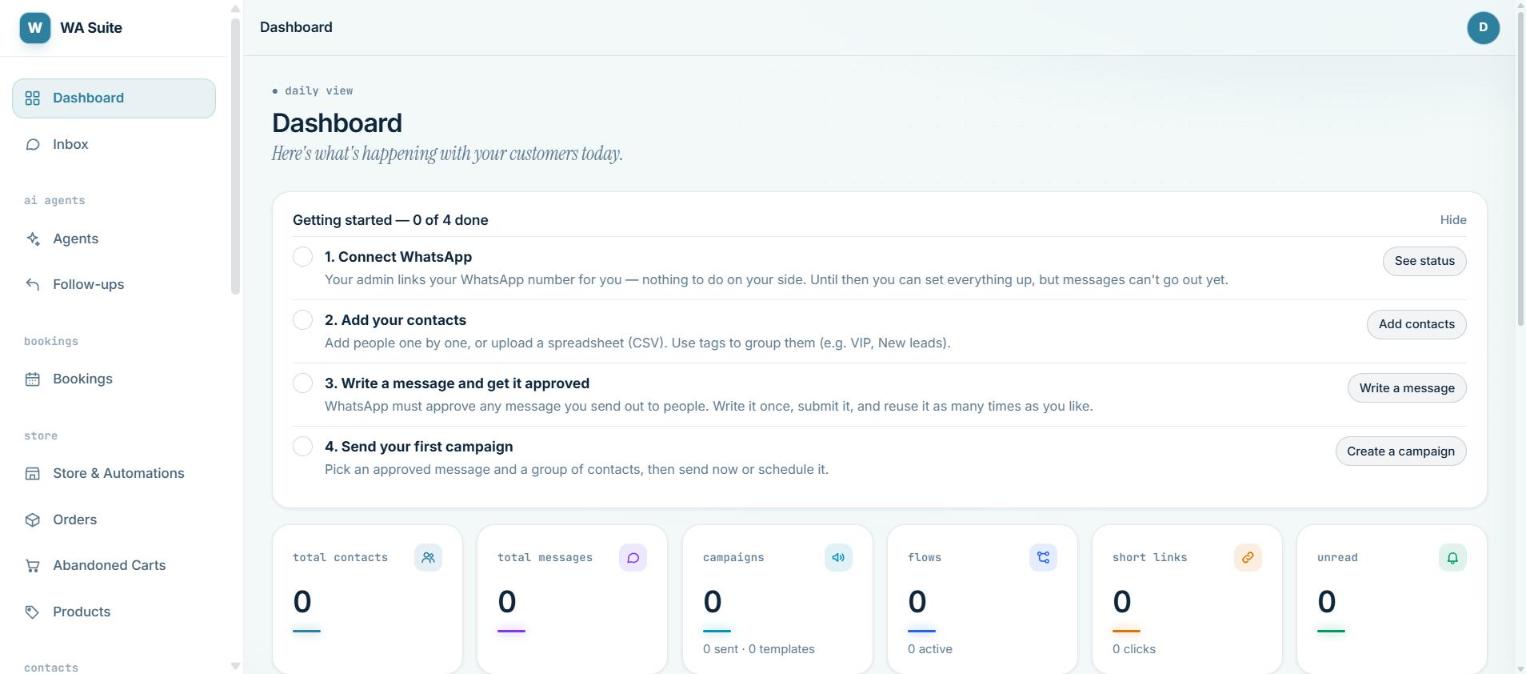
Four setup steps, then the numbers you check each morning.
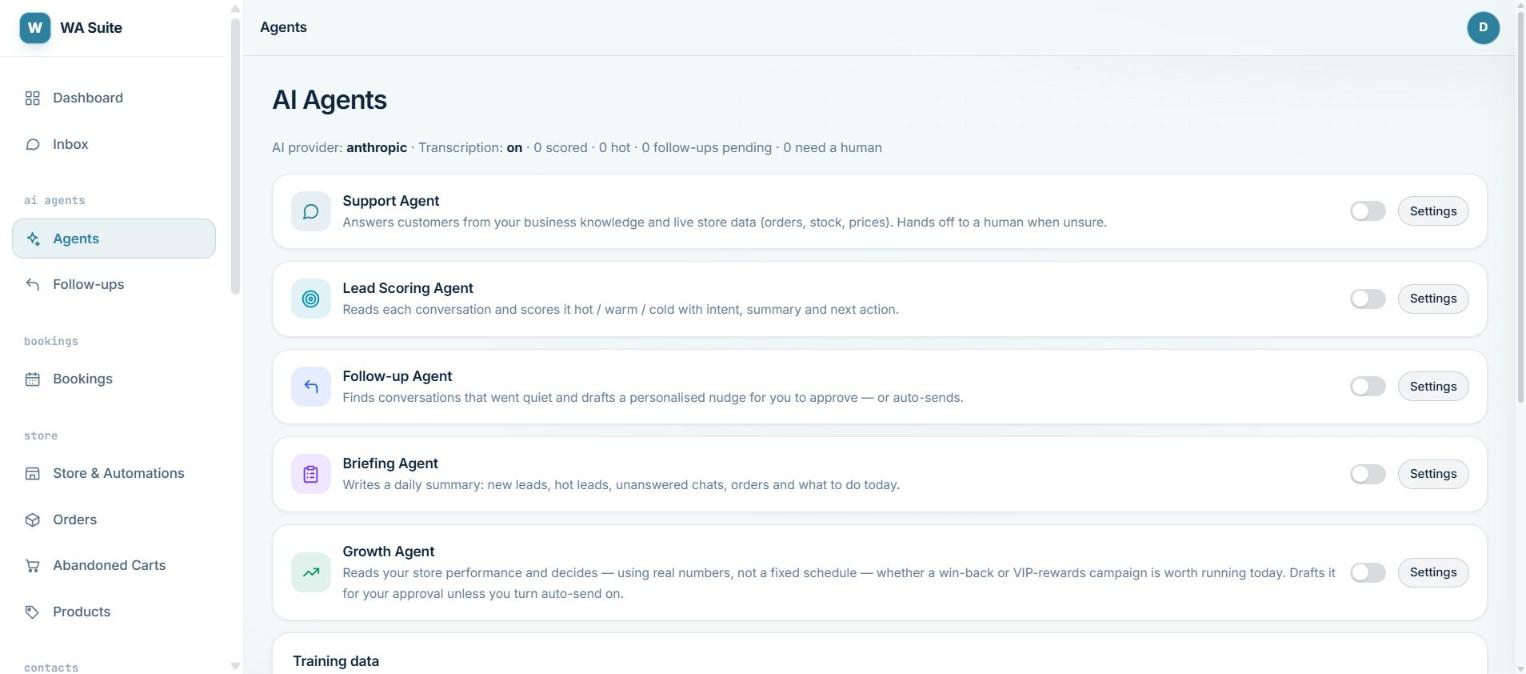
Support, lead scoring, follow-ups, a daily briefing and growth. All start off. Most stores begin with support and add the rest once they trust it.
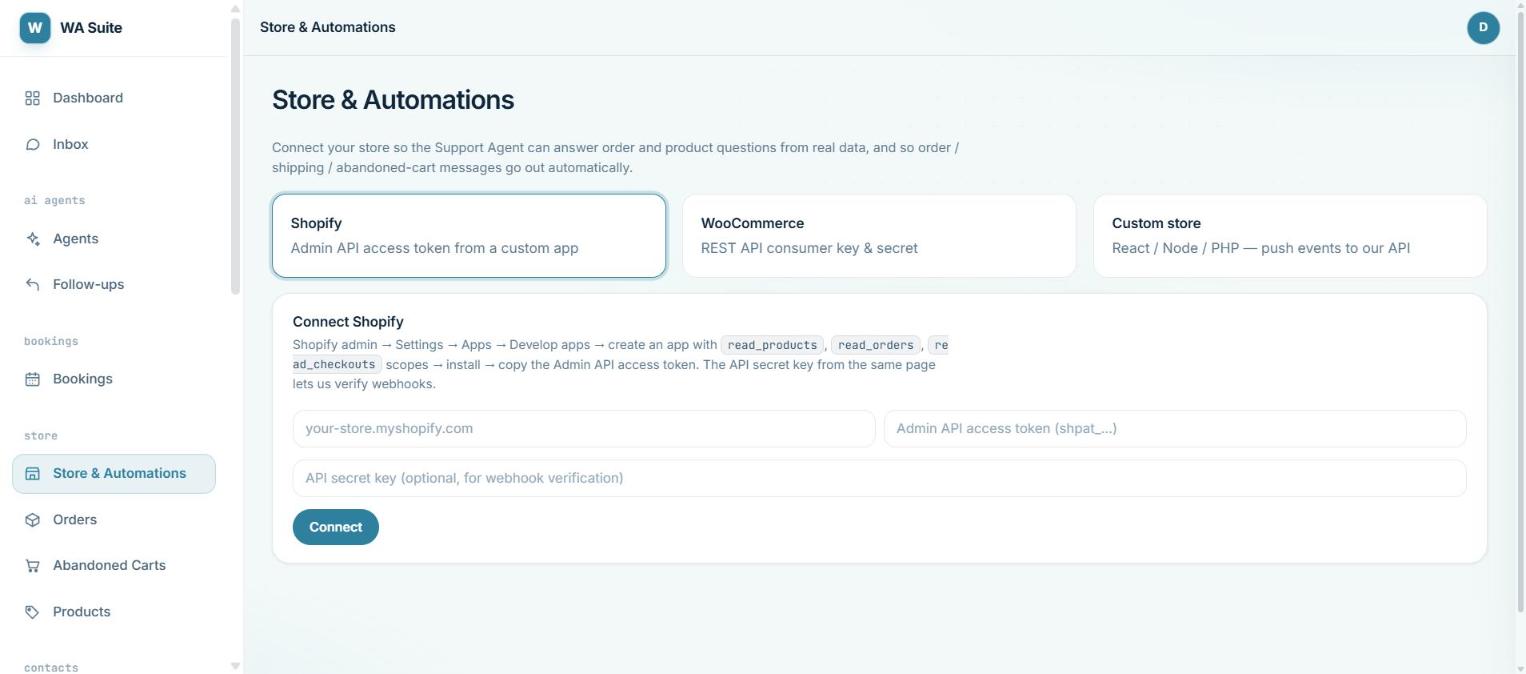
Shopify needs an admin API token from a custom app. WooCommerce needs a REST key. Custom stores push events to our API.
Live in a day, in four steps.
The same four steps you see on the dashboard checklist. We do the first one with you.
Connect your number
Your WhatsApp business number is linked through Meta's sign-up. If the number is on the WhatsApp Business app today, it moves to the API.
With our help · about an hourConnect your store
Paste a Shopify token or WooCommerce key. Products, prices and orders sync from then on.
On your own · 10 minutesWrite one message, get it approved
WhatsApp approves outgoing templates once. Write the cart reminder, submit it, reuse it as often as you like.
Approval usually within a daySwitch on the support agent
Upload your FAQ or price list, turn the agent on, and read its first replies in the inbox before you let it send on its own.
Draft-for-approval mode firstHow the support agent thinks.
It checks your data before it writes. Pick a question a customer might send and read what happens in between.
The example store, products and numbers here are made up for the demo.
Three plans. Every one starts with a 7-day pilot and no card.
Prices exclude GST. Meta's per-message charges are billed at cost on top of the plan; the portal shows the running total. Not sure which plan fits? Start the pilot on Growth and we will tell you if a smaller plan would do.
Questions people ask us.
Do I need a WhatsApp Business API account already?
Will the AI say wrong things to my customers?
Can my team still reply manually?
What does Meta charge?
Which stores does it work with?
What happens after the 7-day pilot?
A note from the team
We built this for stores that answer WhatsApp from a founder's phone at odd hours. The goal is not to replace that person. It is to take the repeated questions and the follow-ups off their plate, and to leave them the decisions.
We are a small team. If the product is not a fit for your store, we would rather say so during the pilot than sell you a plan.
The WhatsApp Suite team, DXD Asia · team@dxdasia.com
Start a 7-day pilot.
Leave your details and we will message you on WhatsApp to set things up. Setup usually takes under a day.
- No card, no automatic charge.
- Your own WhatsApp number.
- We help with the Meta approval.